Tool Wavetable Waldorf Blofeld
Blofeld SysEx Support Added to Batch Wavetable Converter
kimura taro •
I have updated the Batch Wavetable Converter to support the Waldorf Blofeld hardware synthesizer. This new feature allows you to convert, organize, and compile your custom wavetables into Blofeld-compatible .syx (MIDI System Exclusive) files directly in your web browser with no external software required.
Key Features of the Blofeld Mode:
- Interactive 39-Slot Grid Map: Representing the physical user memory map of the Blofeld, you can assign waves directly to WT slots 80 through 118.
- Drag-and-Drop Reordering & Slot Swapping: Drop files from your computer into specific slots, or drag files within the grid to swap or rearrange their positions.
- Automatic Spec Correction: Specify the input frame size, and the engine automatically resamples the cycle length to exactly 128 samples and interpolates the structure to 64 frames.
- Individual Name Editing: Customize the 14-character ASCII name embedded directly inside each SysEx file.
- Organized Filenames: Files are exported inside a ZIP archive, with decimal WT slot numbers prefixed to the filenames (e.g.,
WT080_NAME.syx), ensuring perfect alphabetical sorting on your computer.
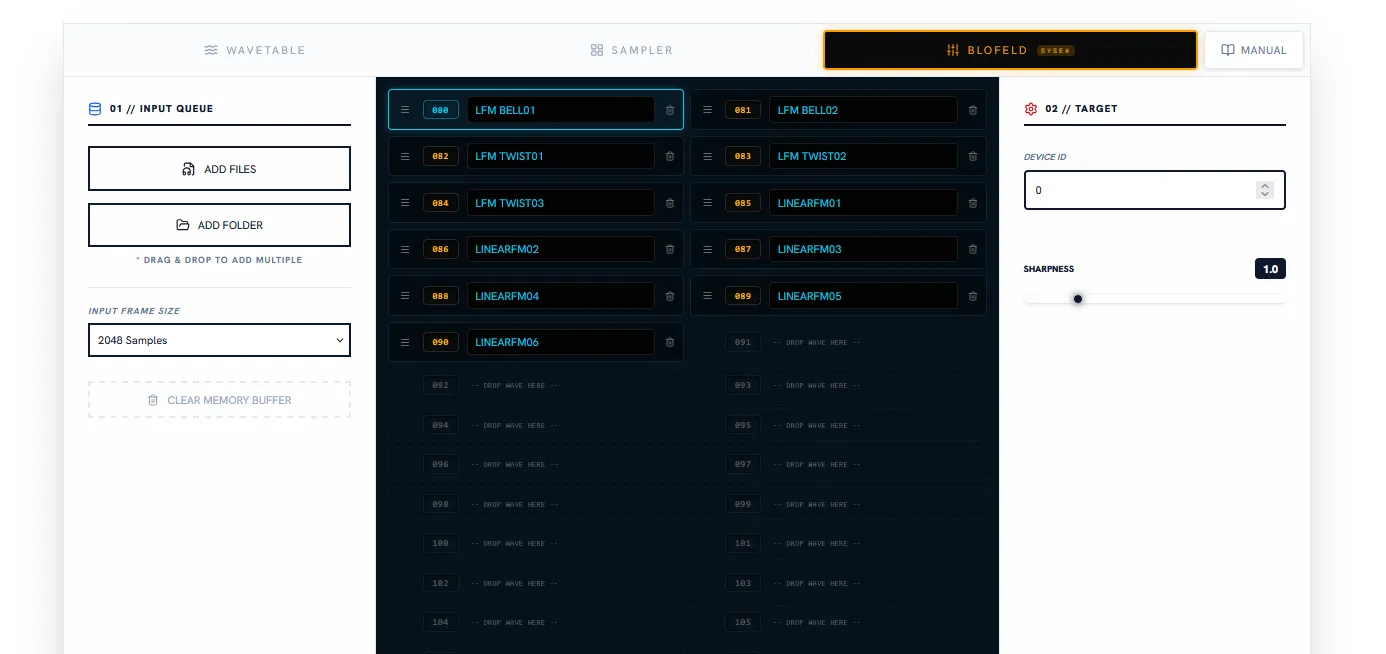 The new 39-slot grid workspace tailored for Waldorf Blofeld librarian and naming duties.
How to Use:
- Open the Batch Wavetable Converter and select the Blofeld tab.
- Set your hardware’s Device ID (defaults to 0).
- Drag and drop your single-cycle or morphing WAV files directly onto your desired slots.
- Double-click or click the text field to edit the 14-character wavetable name.
- Click EXECUTE BATCH to render your bank and download the SysEx ZIP package.
Try it out now in the Batch Wavetable Converter.
![Additive Wavetable Generator [Web Edition]](/_astro/AWG-app-card.CwGmd-8R_Z12yda4.webp)